Showing posts with label IDE. Show all posts

Tuesday, December 30, 2008

How To Turn On Visual Studio 2005 Line Numbering

Step 1:

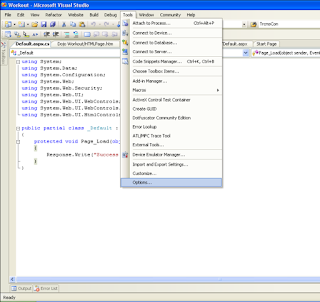
Select Tools from the menu.

Step 2:

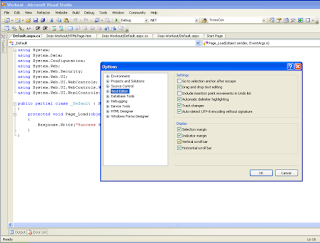
Select Options in Tools Menu,When The Options Dialog is open Select and Expand Text Editor From Tree View.


Step 3:

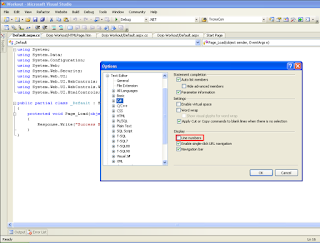
Select C# Node, you can see Display on the Righthand side, below that there is An Line Number Checkbox which unchecked by Default.


Step 4:

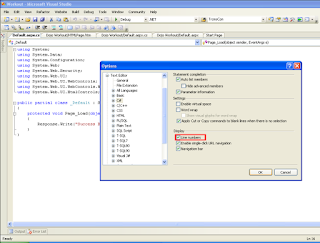
Select that Line Number Checkbox once it checked Click Ok Button.


Step 5:

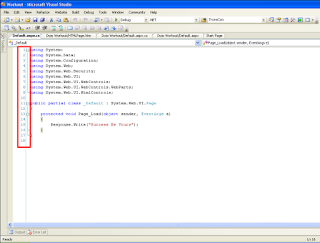
After that when you see your codebehind part there will line number displaying on your window.

Tuesday, January 15, 2008

Try Visual Studio 2008


Microsoft Visual Studio 2008 provides an industry-leading developer experience for Windows Vista, the 2007 Microsoft Office system, and the Web.

90-Day Trial Downloads

Courtesy
microsoft

Saturday, September 15, 2007

Visual Studio 2005 Keyboard Shortcuts(KeyBinding) VII


Navigation


Edit.FindAllReferences SHIFT+F12 or CTRL+K, R


Edit.GoToBrace CTRL+CTRL + ]


Edit.GoToDefi nition F12


Edit.GoToNextLocation F8


Edit.IncrementalSearch CTRL+I


View.ClassViewGo-ToSearch, Combo CTRL+K,CTRL+V


View.Forward-BrowseContext CTRL+SHIFT+7


View.PopBrowse-Context CTRL+SHIFT+8


View.Navigate-Backward CTRL+MINUS+SIGN (-)


View.Navigate-Forward CTRL+SHIFT+MINUS SIGN (-)


Edit.FindInFiles CTRL +SHIFT + F


Edit.FindSymbol ALT+F12


View.ViewCode F7


View.ViewDesigner SHIFT+F7


Note: Switches to Design to Source (Available only in Source view.)


View.ViewMarkup SHIFT+F7


Note:Switches to Source to Design (Available only in Design view.)


Window.MoveTo-NavigationBar CTRL+F2


Edit.Find CTRL+F


Edit.GoTo CTRL+G


Edit.GoToFindCombo CTRL+/


Friday, September 14, 2007

Visual Studio 2005 Keyboard Shortcuts(KeyBinding) VI


Debugging


Debug.Autos CTRL+D, A


Debug.CallStack CTRL+D, C


Debug.Immediate CTRL+D, I


Debug.Locals CTRL+D, L


Debug.QuickWatch CTRL+D, Q


Debug.Start CTRL+F5


Debug.StartWithoutDebugging CTRL+F5


Debug.StepInto F11


Debug.StepOut SHIFT+F11


Debug.StepOver F10


Debug.Stop-Debugging SHIFT+F5


Debug.Toggle-Breakpoint F9


Debug.Watch CTRL+D, W


Debug.Enable-Breakpoint CTRL+F9


Make Datatip Transparent [CTRL]


Thursday, September 13, 2007

Visual Studio 2005 Keyboard Shortcuts(KeyBinding) Part V


Window


View.ClassView CTRL+W, C


View.CodeDefi nition-Window CTRL+W, D


View.Command-Window CTRL+W, A


View.ErrorList CTRL+W, E


View.ObjectBrowser CTRL+W, J


View.Output CTRL+W, O


View.PropertiesWindow CTRL+W, P


View.SolutionExplorer CTRL+W, S


View.TaskList CTRL+W, T


View.Toolbox CTRL+W, X


View.ServerExplorer CTRL+W, L


Window.Close-ToolWindow SHIFT +ESC


Data.ShowDataSources SHIFT+ALT+D


Window.Close-Document,
Window
CTRL+F4


Window.Next-Document,
Window Nav
CTRL+TAB


Wednesday, September 12, 2007

Visual Studio 2005 Keyboard Shortcuts(KeyBinding) Part IV


Refactoring


Refactor.-EncapsulateField CTRL+R, E


Refactor.Extract-Interface CTRL+R, I


Refactor.ExtractMethod CTRL+R, M


Refactor.Promote-LocalVariableto-Parameter CTRL+R, P


Refactor.Remove-Parameters CTRL+R, V


Refactor.Rename CTRL+R, R OR F2


Refactor.Reorder-Parameters CTRL+R, O


Tuesday, September 11, 2007

Visual Studio 2005 Keyboard Shortcuts(KeyBinding) Part III


IntelliSense


Edit.CompleteWord CTRL+SPACEORCTRL+ K, W


Edit.ListMembers CTRL+JORCTRL+K, L


Edit.QuickInfo CTRL+K, I


Edit.ParameterInfo CTRL+SHIFT+SPACEORCTRL+K, P


Build


Build.BuildSolution F6 OR CTRL+SHIFT+B


Build.BuildSelection SHIFT+F6


Monday, September 10, 2007

Visual Studio 2005 Keyboard Shortcuts(KeyBinding) Part II


Editing


Edit.CollapseTo-Definitions CTRL+M, O


Edit.ToggleAllOutlining CTRL+M, L


Edit.Toggle-OutliningExpansion CTRL+M, M


Edit.StopOutlining CTRL+M, P


Edit.CommentSelection CTRL+K, C


Edit.Uncomment-Selection CTRL+K, U


Edit.FormatDocument CTRL+K, D


Edit.FormatSelection CTRL+K, F


Edit.InsertSnippet CTRL+K, X


Edit.SurroundWith CTRL+K, S


Edit. Invoke Snippet From Shortcut TAB


Edit.CycleClipboardRing CTRL+SHIFT+V


Edit.Replace CTRL+H


Edit.ReplaceInFiles CTRL+SHIFT+H


View.ShowSmartTag CTRL+. or SHIFT +ALT+F10


Sunday, September 9, 2007

Visual Studio 2005 Keyboard Shortcuts(KeyBinding) Part I

File


File.NewProject                        CTRL+SHIFT+N


File.OpenProject                     CTRL+ SHIFT+O


File.OpenFile                            CTRL+O


Project.AddClass                     SHIFT+ALT+C


Project.AddExisting-Item SHIFT+ALT+A


Project.AddNewItem           CTRL+SHIFT+A

Saturday, August 11, 2007

Setting Up | Changing the default browser used in VS 2005

Step 1: Open a WebForm .aspx file in .NET IDE.

Setp 2: Select the "Browse With..." option from the File menu.

Or

1) Right click on a .aspx page in your solution explorer

2) Select the "browse with" context menu option


Step 2.1
:Browser Dialog Will displayed in screen.

Step 2.2:Click Add Button From the Browser Dialog.

Step 3:In the Add Dialog, Two think have to mention,Program name and friendly name.

Step 3.1: In Program name, have to give the Full Path Of the Browser.
For Example:
Opera :"C:\Program Files\Opera\Opera.exe".
FireFox:"C:\Program Files\Firefox\firefox.exe".
Step 3.2:Friendly Name, You can give any name as your wish.

Step 4:Select your preferred browser from the list and click the "Set as Default" button.